开始
- 编译命令
1 | javac --module-path lib文件路径 --add-modules javafx.controls 文件名.java |
- 运行命令
1 | java --module-path lib文件路径 --add-modules javafx.controls 文件名 |
基础
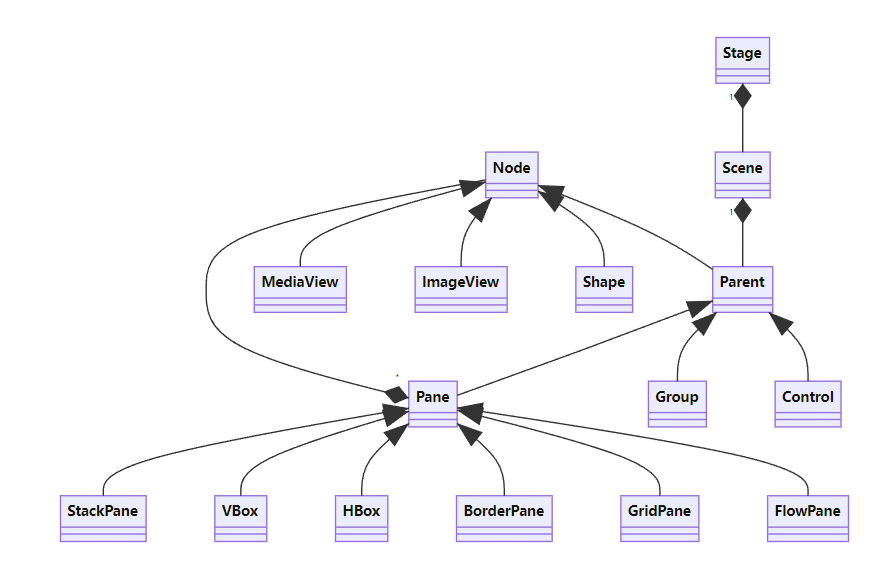
- 主类是 javafx.application.Application 的子类
- Stage.show()
- 防止改变 Stage 大小:stage.setResizable(false)
- Scene(Parent, width, height) 或 Scene(Parent) 构造Scene
- Scene 不能包含 Node,Pane 和 Group 可以包含Node
- 属性绑定:单向用 bind,双向用 bindBidirectional
- 抽象类 IntegerProperty,其实例 SimpleIntegerProperty
- Node 样式:styleName:value,styleName 以 -fx- 做前缀
- 面板和 UI 组件对象可以转换和缩放,但组、形状和文本对象不能修改大小
- 不能将 ImageView 或 TextField 多次放入一个 Pane 或 Stage
| +Point2D(x: double, y: double) +distance(x: doubel, y: double): double +distance(p: Point2D): double +getX(): double +getY(): double +midpoint(p: Point2D): Point2D +toString(): String |
用给定的 x,y 创建对象 返回该点到定点(x, y)的距离 返回该点到 p 的距离 返回该点的 x 坐标 返回该点的 y 坐标 返回该点和 p 的中间点 返回该点的字符串表示 |
字体
| -red: double -green: double -blue: double -opacity: double |
-size: double -name: String -family: String |
| +Color(r: double, g: double, b: double, opacity: double) +brighter(): Color +darker(): Color +color(r: double, g: double, b: double): Color +color(r: double, g: double, b: double, opacity: double): Color +rgb(r: int, g: int, b: int): Color +rgb(r: int, g: int, b: int, opacity: int): Color |
+Font(size: double) +Font(name: String, size: double) +font(name: String, size: double) +font(name: String, w: FontWeight, size: double) +font(name: String, w: FontWeight, p: FontPosture, size: double,) +getFontNames(): List |
Color, Font 类是不可修改的,FontPosture:FontPosture.ITALIC, FontPosture.REGULAR
图像
| -error: ReadOnlyBooleanProperty -height: ReadOnlyDoubleProperty -width: ReadOnlyDoubleProperty -progress: ReadOnlyDoubleProperty |
表明图像是否正确载入 高度 宽度 图像载入百分比 |
| +Image(filenameOrURL: String) | 创建一个从文件或 URL 载入的 Image |
| -fitHeight: DoubleProperty -fitWidth: DoubleProperty -x: DoubleProperty -y: DoubleProperty -image: ObjectProperty |
图像改变大小来适应边框高度 图像改变大小来适应边框宽度 对象原点 x 坐标 对象原点 y 坐标 |
| +ImageView() +ImageView(image: Image) +ImageView(filenameOrURL: String) |
创建对象 用给定 Image 创建对象 创建一个从文件或 URL 载入的对象 |
面板和组
| 类 | 描述 |
|---|---|
| Pane | 面板的基类,getChildren() 返回面板中的 Node 列表 |
| StackPane | Node 放置在面板中央,并且叠加 |
| FlowPane | Node 水平放置或垂直放置 |
| GridPane | Node 放置在二维网格中 |
| BorderPane | Node 放在顶部,底部,右边,左边以及中间区域 |
| HBox | 单行放置 |
| VBox | 单列放置 |
FlowPane 和 BorderPane
| -alignment: ObjectProperty<Pos> -orientaion: ObjectProPerty<Orientation> -hgap: DoubleProperty -vgap: DoubleProperty |
-top: ObjectProperty<Node> -right: ObjectProperty<Node> -bottom: ObjectProperty<Node> -left: ObjectProperty<Node> -center: ObjectProperty<Node> |
| +FlowPane() +FlowPane(hgape: double, vgap: double) +FlowPane(orientation: ObjectProPerty<Orientation>) +FlowPane(orientation: ObjectProPerty<Orientation>, hgape: double, vgap: double) |
+BorderPane() +BorderPane(node: Node) +setAllignment(child: Node, pos: Pos) |
alignment 表示对齐方式,默认 Pos.LEFT
orientation 表示面板方向,默认 Orientation.HORIZONTAL
hgap 表示水平间距,默认0
GridPane
| -alignment: ObjectProperty<Pos> -gridLinesVisible: BooleanProPerty -hgap: DoubleProperty -vgap: DoubleProperty |
对齐方式 网格线是否可见,默认 false 水平间距 垂直间距 |
| +GridPane() +add(child: Node, columnIdex: int, rowIndex: int): void +addColumn(collumnIndex: int, children: Node...): void +addRow(rowIndex: int, children: Node...): void +getColumnIndex(child: Node): int +setColumnIndex(child: Node, columnIndex: int): void +getRowIndex(child: Node): int +setRowIndex(child: Node, rowIndex: int): void +setHalighnment(child: Node, value: HPos): void +setValighnment(child: Node, value: VPos): void |
创建对象 添加一个结点到指定的列和行 添加多个结点到指定的列 添加多个结点到指定的行 返回结点的列下标 设置结点的列下标 返回结点的行下标 设置结点的行下标 为结点设置水平对齐 为结点设置垂直对齐 |
setPrefWidth() 和 setPreHeight() 设置一个大的值,这样网格面板变大时,内容会自动扩充
HBox 和VBox
| -alignment: ObjectProperty<Pos> -fillHeight: BooleanProperty -spacing: DoubleProperty |
-alignment: ObjectProperty<Pos> -fillWidth: BooleanProperty -spacing: DoubleProperty |
| +HBox() +HBox(spacing: double) +setMargin(node: Node, value: Insets): void |
+VBox() +VBox(spacing: double) +setMargin(node: Node, value: Insets): void |
形状
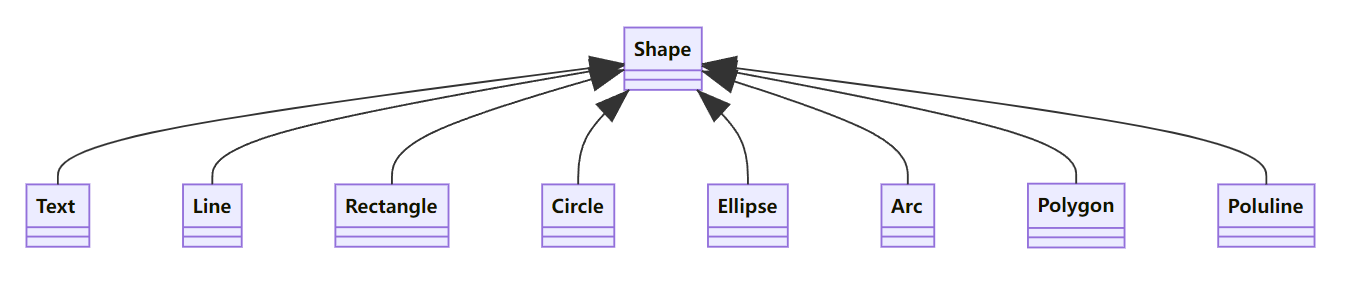
- fill 属性指定形状内部颜色
- Stroke 属性指定轮廓颜色
- strokeWidth 属性指定轮廓宽度
Text 和 Line
| -text: StringProperty -x: DoubleProperty -y: DoubleProperty -underline: BooleanProperty -strikethrough: BooleanProperty -font: ObjectProperty |
-startX: DoubleProperty -startY: DoubleProperty -endX: DoubleProperty -endX: DoubleProperty |
| +Text() +Text(text: String) +Text(x: double, y: double, text: String) |
+Line() +Line(startX: double, startY: double, endX: double, endY: double) |
Rectangle 和 Circle
| -x: DoubleProperty -y: DoubleProperty -width: DoubleProperty -heigth: DoubleProperty -arcWidth: DoubleProperty -arcHeigth: DoubleProperty |
-centerX: DoubleProperty -centerY: DoubleProperty -radius: DoubleProperty |
| +Rectangle() +Rectangle(x: double, y: double, width: double, height: double) |
+Circle() +Circle(x: double, y: double) +Circle(x: double, y: double, radius: double) |
Ellipse 和 Arc
| -centerX: DoubleProperty -centerY: DoubleProperty -radiusX: DoubleProperty -radiusY: DoubleProperty |
-centerX: DoubleProperty -centerY: DoubleProperty -radiusX: DoubleProperty -radiusY: DoubleProperty -startAngle: DoubleProperty -length: DoubleProperty -type: ObjectProperty<ArcType> |
| +Ellipse() +Ellipse(x: double, y: double) +Ellipse(x: double, y: double, radiusX: double, radiusY: double) |
+Arc() +Arc(x: double, y: double, radiusX: double, radiusY: double, startAngle: double, length: double) |
type:弧的闭合类型,有 ArcType.OPEN, ArcType.CHORD, ArcType.ROUND
Polygon 和 Polyline
| +Polygon() +Polygon(double...points) +getPoints(): ObvervableList |
事件
| 动作 | 源对象 | 事件类型 | 注册方法 |
|---|---|---|---|
| 单击按钮 | Button | ActionEvent | setOnAction(EventHandler<ActionEvent>) |
| 回车 | TextField | ActionEvent | setOnAction(EventHandler<ActionEvent>) |
| 勾选或取消勾选 | RadioButton | ActionEvent | setOnAction(EventHandler<ActionEvent>) |
| 勾选或取消勾选 | CheckBox | ActionEvent | setOnAction(EventHandler<ActionEvent>) |
| 选择一个新的项 | ComboBox | ActionEvent | setOnAction(EventHandler<ActionEvent>) |
| 按下鼠标 | Node、Scene | MouseEvent | setOnMousePressed(EventHandler<MouseEvent>) |
| 释放鼠标 | setOnMouseReleased(EventHandler<MouseEvent>) | ||
| 单击鼠标 | setOnMouseClicked(EventHandler<MouseEvent>) | ||
| 鼠标进入 | setOnMouseEntered(EventHandler<MouseEvent>) | ||
| 鼠标退出 | setOnMouseExited(EventHandler<MouseEvent>) | ||
| 鼠标移动 | setOnMouseMoved(EventHandler<MouseEvent>) | ||
| 鼠标拖动 | setOnMouseDragged(EventHandler<MouseEvent>) | ||
| 按下键 | Node、Scene | KeyEvent | setOnKeyPressed(EventHandler<keyEvent>) |
| 释放键 | setOnKeyReleased(EventHandler<keyEvent>) | ||
| 敲击键 | setOnKeyTyped(EventHandler<keyEvent>) |
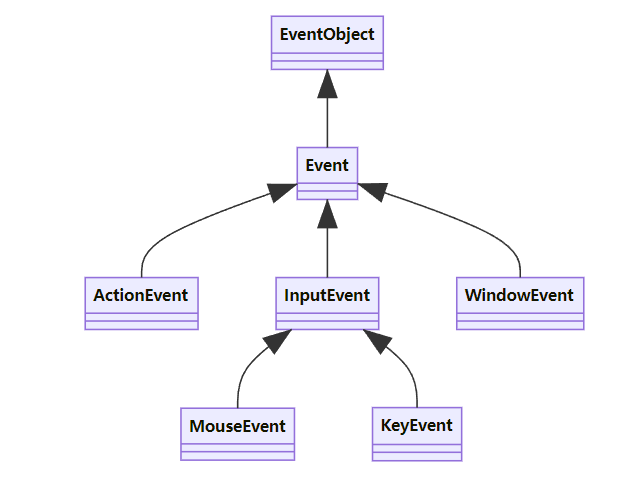
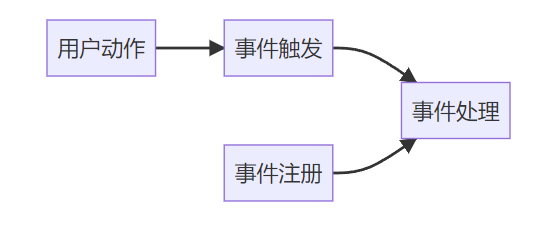
处理器接口 EventHandler<T extends Event>,每个处理器都有 handle(T e) 方法处理事件
鼠标事件
| +getButton(): MouseButton +getClickCount(): int +getX(): double +getY(): double +getSceneX(): double +getSceneY(): double +getScreenX(): double +getScreenY(): double +isAltDown(): boolean +isControlDown(): boolean +isMetaDown(): boolean +isShiftDown(): boolean |
表明哪个鼠标被单击 返回事件中鼠标的单击次数 返回事件源结点中鼠标的 x 坐标 返回事件源结点中鼠标的 y 坐标 返回场景中鼠标点的 x 坐标 返回场景中鼠标点的 y 坐标 返回屏幕中鼠标点的 x 坐标 返回屏幕中鼠标点的 y 坐标 如果该事件中 Alt 键被按下,返回 true 如果该事件中 Control 键被按下,返回 true 如果该事件中 Meta 按钮被按下,返回 true 如果该事件中 Shift 键被按下,返回 true |
MouseButton 中有四个常数,分别是 PRIMARY、SECONDARY、MIDDLE 和 NONE,分别表示左键、右键、中键以及无键
可以用 getButton()==MouseButton.SECONDARY 判断是否是右键被按下
键盘事件
| +getCharacter(): String +getCode(): keyCode +getText(): String +isAltDown(): boolean +isControlDown(): boolean +isMetaDown(): boolean +isShiftDown(): boolean |
返回事件对应的字符,按下键或释放键返回空字符串 返回该事件中该键对应的编码,敲击键返回 UNDEFINED 返回描述键编码的字符串 如果 Alt 被按下,返回 true 如果 Control 被按下,返回 true 如果 Meta 被按下,返回 true 如果 Shift 被按下,返回 true |
keyCode 枚举常量
| 常量 | 描述 | 常量 | 描述 |
|---|---|---|---|
| HOME | Home 键 | DOWN | 下箭头键 |
| END | End 键 | LEFT | 左箭头键 |
| PAGE_UP | Page Up 键 | RIGHT | 右箭头键 |
| PAGE_DOWN | Page Down 键 | ESCAPE | Esc 键 |
| UP | 上箭头键 | TAB | Tab 键 |
| CONTROL | Control 键 | ENTER | Enter 键 |
| SHIFT | Shift 键 | UNDEFINED | keyCode 未知 |
| BACK_SPACE | Backspace 键 | F1-F12 | 从 F1 到 F12 的函数键 |
| CAPS | Caps Lock 键 | 0-9 | 从 0 到 9 的数字键 |
| NUM_LOCK | Num Lock 键 | A-Z | 从 A 到 Z 的字母键 |
可观察对象的监听器
动画
| -autoReverse: BooleanProperty -cycleCount: IntegerProperty -rate: DoubleProperty -status: ReadOnlyObjectProperty<Animation.Status> |
定义了交替周期中动画是否需要倒转方向 定义了动画的循环次数, 定义了动画的速度和方向 只读属性,表明了动画的状态 |
| +pase(): void +play(): void +stop(): void |
暂停动画 从当前位置开始播放 停止动画并重置动画 |
Timeline.INDEFINITE 表明无限循环,status 定义了常量 PAUSE、RUNNING 和 STOPPED
| -duration(): ObjectProperty<Duration> -node: ObjectProperty<Node> -orientation: ObjectProperty<PathTransition.OrientationType> -path: ObjectType<Shape> |
变换持续时间 变换目标结点 结点沿着路径的方向 一个结点移动路径的形状 |
| +PathTransition() +PathTransition(duration: Duration, path: Shape) +PathTransition(duration: Duration, path: Shape, node: Node) |
创建对象 给定时间和路径创建对象 给定时间、路径和结点创建对象 |
Duration 类定义了持续时间,不可更改,用 Duration(millis: double) 创建
其中定义了常量 INDEFINTEONE、UNKNOW 和 ZERO分别代表了无限循环、1毫秒、未知以及0毫秒
常量 NONE 和 ORTHOGONAL_TO_TANGET 在PathTransition.OrientationType 中定义,后者确定结点在沿着几何路径移动的时候是否和路径的切线保持垂直
| -duration: ObjectProperty<Duration> -node: ObjectProperty<Node> -fromValue: DoubleProperty -toValue: DoubleProperty -byValue: DoubleProperty |
变换的持续时间 变换的目标结点 该动画的起始透明度 该动画的结束透明度 该动画的透明度递增值 |
| +pase(): void +play(): void +stop(): void |
创建对象 给定持续时间创建对象 该点持续时间和结点创建对象 |
UI 组件
Label、Button 和
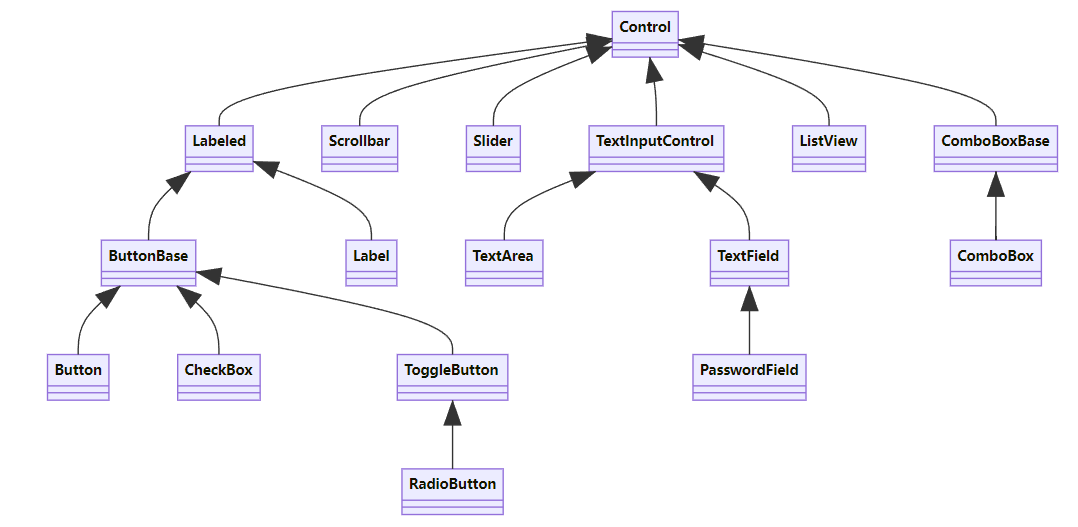
| -alignment: ObjectProperty<Pos> -contentDisplay: ObjectProperty<ContentDisplay> -graphic: ObjectProperty<Node> -graphicTextGap: DoubleProperty -textFill: ObjectProperty -text: String -underline: BooleanProperty -wrapText: BooleanProperty |
对齐方式 指定结点相对文本位置 标签中的图形 图形和文本之间的间隔 用于填充文本的图画 标签中的文本 文本是否有下划线 如果文本超过宽度,是否需要换行 |
ContentDisplay 中常量 TOP、BOTTOM、LEFT、RIGHT 指定结点相对文本位置
| -onAction: ObjectProperty<EventHandler<ActionEvent>> | 定义一个处理按钮动作的处理器 |
| +Label() +Label(text: String) +Label(text: String, graphic: Mode) |
创建对象 用指定文本创建对象 用指定文本和图片创建对象 |
| +Button() +Button(text: String) +Button(text: String, graphic: Node) |
创建对象 给定文本创建对象 给定文本和图片创建对象 |
CheckBox 和 RadioButton
| -selected: BooleanProperty | 标识一个复选框是否被选中 |
| +CheckBox() +CheckBox(text: String) |
创建对象 以指定文本创建对象 |
| -selected: BooleanProperty -toggleGroup: ObjectProperty<ToggleGroup> |
标识按钮是否被选中 指定按钮所属组 |
| +ToggleButton() +ToggleButton(text: String) +ToggleButton(text: String, graphic: Node) |
创建对象 以指定文本创建对象 以指定文本和图形创建对象 |
| +RadioButton() +RadioButton(text: String) |
创建对象 以指定文本创建对象 |
TextField 和 TextArea
| -text: StringProperty -editable: BooleanProperty |
该组件的文本内容 表明文本是否可编辑 |
| -alignment: ObjectProperty<Pos> -prefColumnCount: IntegerProperty -onAction: ObjectProperty<EventHandler<ActionEvent>> |
对齐方式 指定文本域的首选列数 指定文本域上处理动作事件的处理器 |
| +TextField() +TextField(text: String) |
创建对象 以指定文本创建对象 |
| -prefColumnCount: IntegerProperty -prefColumnCount: IntegerProperty -wrapText: BooleanProperty |
指定文本域的首选列数 指定文本域的首选行数 指定文本是否要折到下一行 |
| +TextArea() +TextArea(text: String) |
创建对象 以指定文本创建对象 |
ComboBox
| -value: ObjectProperty -editable: BooleanProperty -onAction: ObjectProperty<EventHandler<ActionEvent>> |
在一个组合框中选择的值 指定组合框是否允许用户输入 指定处理动作事件的处理器 |
| -items: ObjectProperty<ObservableList<T>> -visibleRowCount: IntegerProprety |
在组合框中弹出的部分选项 组合框弹出部分最多可以显示的行数 |
| +ComboBox() +ComboBox(items: observableList<T>) |
创建对象 以指定选项创建对象 |
ListView
| -items: ObjectProperty<ObservableList<T>> -orientation: BooleanProperty -selectionModel: ObjectProperty<MulitpleSelectionModel<T>> |
列表视图中的选项 指明选项在列表视图中水平还是垂直显示 指明选项是如何被选定的 |
| +ListView() +ListView(items: observableList<T>) |
创建对象 以指定选项创建对象 |
ScrollBar 和 Silder
| -blockIncrement: DoubleProperty -max: DoubleProperty -min: DoubleProperty -unitIncrement: DoubleProperty -value: DoubleProperty -visibleAmount: DoubleProperty -oritntation: ObjectProperty<Orientation> |
单击滚动条的调节值(默认10) 滚动条代表的最大值(默认100) 滚动条代表的最小值(默认0) 方法调用时的调节值 滚动条的当前值(默认0) 滚动条宽度(默认15) 滚动条方向(默认 HORIZONTAL) |
| +ScrollBar() +increment() +decrement() |
创建对象 以 unitIncrement 增加滚动条的值 以 unitDecrement 减小滚动条的值 |
| -blockIncrement: DoubleProperty -max: DoubleProperty -min: DoubleProperty -value: DoubleProperty -oritntation: ObjectProperty<Orientation> -majorTickUnit: DoubleProperty -minorTickCount: DoubleProperty -showTickLabels: BooleanProperty -showTickMarks: BooleanPropery |
单击滚动条的调节值(默认10) 滚动条代表的最大值(默认100) 滚动条代表的最小值(默认0) 滚动条的当前值(默认0) 滚动条方向(默认 HORIZONTAL) 主刻度之间的单元距离 两主刻度之间放置的次刻度数 指定是否显示刻度标签 指定是否显示刻度 |
| +Slider() +Slider(min: double, max: double, value: double) |
创建默认水平滑动条 以初始值创建对象 |
媒体
| -duration: ReadOnlyObjectProperty<Duration> -width: ReadOnlyIntegerProperty -heigth: ReadOnlyIntegerProperty |
源媒体以秒计时的持续时间 源视频以像素为单位的宽度 源媒体以像素为单位的高度 |
| +Media(source: String) | 从一个 URL 源创建对象 |
| -autoPlay: BooleanProperty -currentCount: ReadOnlyIntegerProperty -cycycleCount: IntegerProperty -mute: BooleanProperty -volume: DoubleProperty -totalDuration: ReadOnlyObjectProperty<Duration> |
指定播放是否自动开始 已经完成的循环播放次数 指定媒体的播放次数 指定音频是否静音 音频的音量 从开始到结束播放媒体的持续时间 |
| +MediaPlayer(media: Media) +play(): void +pause(): void +seek(): void |
从媒体创建播放器 播放媒体 暂停媒体播放 将播放器定位到一个新的重新播放点 |
| -x: DoubleProperty -y: DoubleProperty -mediaPlayer: ObjectProperty<MediaPlayer> -fitWidth: DoubleProperty -fitHeight: DoubleProperty |
指定媒体视图当前的 x 坐标 指定媒体视图当前的 y 坐标 为媒体视图指定媒体播放器 为媒体指定视图宽度 为媒体指定视图高度 |
| +MediaView() +MediaView(mediaPlayer: mediaPlayer) |
创建对象 以指定媒体播放器创建媒体视图 |